Making ads smart -- Adapting ads to the device
Friday, January 13, 2012 | 9:00:00 AM
Labels: AdSense features
As smartphones and tablets become more and more popular, your websites are being viewed on a wider variety of devices - with different screen sizes and features. We’ve recently discussed the importance of having mobile friendly sites and the best ways to monetize them, and also just released Custom Search Ads for Mobile to help you take advantage of this trend. As part of our focus on helping you monetize your content across all screen sizes, we’ll soon also be improving the way ads appear on different devices.
We’re making our text ads smarter and will soon display them differently so they perform optimally depending on where users are viewing them from: computers, tablets, or smartphones. The best part is that our ads do the right thing automatically - without any changes required to your web pages - by detecting what device your web page is being viewed from.
With this change, we’re taking advantage of the unique features of mobile devices to deliver more engaging, better-performing ads. Since the screens are smaller, we’re reducing the number of ads per ad slot and increasing the size of the text to make them more legible and noticeable.
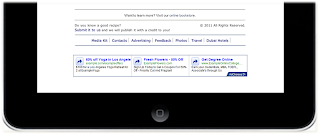
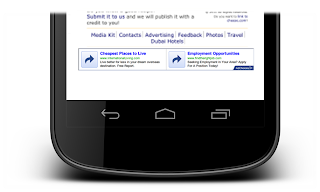
We’re also providing a big button on each ad to make it easy for users to select the ads using a touch screen. Here’s how the 728x90 leaderboard will appear differently on the different platforms.
We’re making our text ads smarter and will soon display them differently so they perform optimally depending on where users are viewing them from: computers, tablets, or smartphones. The best part is that our ads do the right thing automatically - without any changes required to your web pages - by detecting what device your web page is being viewed from.
With this change, we’re taking advantage of the unique features of mobile devices to deliver more engaging, better-performing ads. Since the screens are smaller, we’re reducing the number of ads per ad slot and increasing the size of the text to make them more legible and noticeable.
We’re also providing a big button on each ad to make it easy for users to select the ads using a touch screen. Here’s how the 728x90 leaderboard will appear differently on the different platforms.
Desktop
Tablet
Phone
We’re continuing to look for ways to improve ad performance for publishers, no matter what size screen your users are accessing your site from. Stay tuned to Inside AdSense for more updates.Posted by Priya Gupta, Mobile Ads Engineering


6 comments :
Robert said...
I guess this means i wont need to make a mobile ad unit anymore? Normal ad units will sufice? Also on my ipad all the ad units seem to have a big arrow next to the ad. Personaly I would like to see that arrow on all my ads, wether it is viewed on a mobile device or regular pc. And when I create a mobile ad unit the arrows do not seem to be there, only on regular ad units watched with a mobile device. Is this an error or on purpouse?
January 14, 2012 11:18 AM
PRAMOD BAVISKAR said...
GOOGLE REALLY HELPING MILLIONS WEBMASTERS!
January 14, 2012 11:29 PM
greens said...
I noticed an strange and unusual adsense block on mashable, after each article title. It has 642x65 pixels. how I can get one too?
January 15, 2012 1:31 PM
Anak Jogja said...
I Like it..
Thanks for share..
January 16, 2012 4:23 PM
Foomandoonian said...
Are there any good examples of these ads in action? I've been unable to find any.
January 17, 2012 5:15 AM
gquisjo said...
I was searching for anything on "adsense optimization for mobile webpages". Our ads don't show in the mobile version ads of our website. Any suggestions on how to make it show without an Mobile Ad unit?
April 26, 2012 1:05 AM
Post a Comment